CoolSim is computational fluid dynamics (CFD) software for data centers. You build a model of the room: its racks, cooling units, floor tiles, ducts and containment. CoolSim meshes the model and solves it with Ansys Fluent on our cloud servers, then returns a report of where the air and heat went: the intake temperature of every rack, the flow through every tile, maps and pathlines of the air, and the room’s cooling metrics. The report opens in any web browser.
New to CFD? What is CFD? explains how a simulation is built and solved.
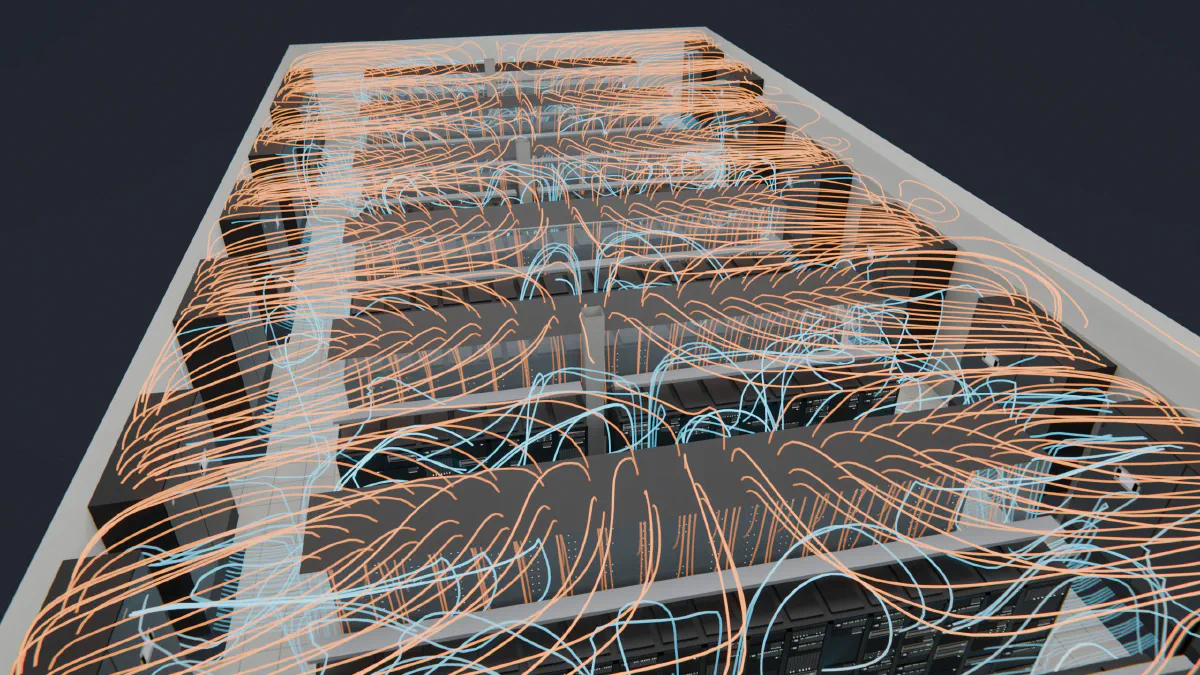
Airflow in a hall with contained aisles, from a CoolSim result. Blue is supply air from the floor; orange is warm exhaust on its way back to the cooling units.
Key features
Built from the equipment you already know
The model builder names equipment the way a data center team does: CRAC, rack, tile, duct, diffuser. Objects are dragged into a 3D view of the room, and libraries of common equipment can be reused from one model to the next, including objects you define yourself. Training is online, at your own pace, and past sessions are in the webinar archive.
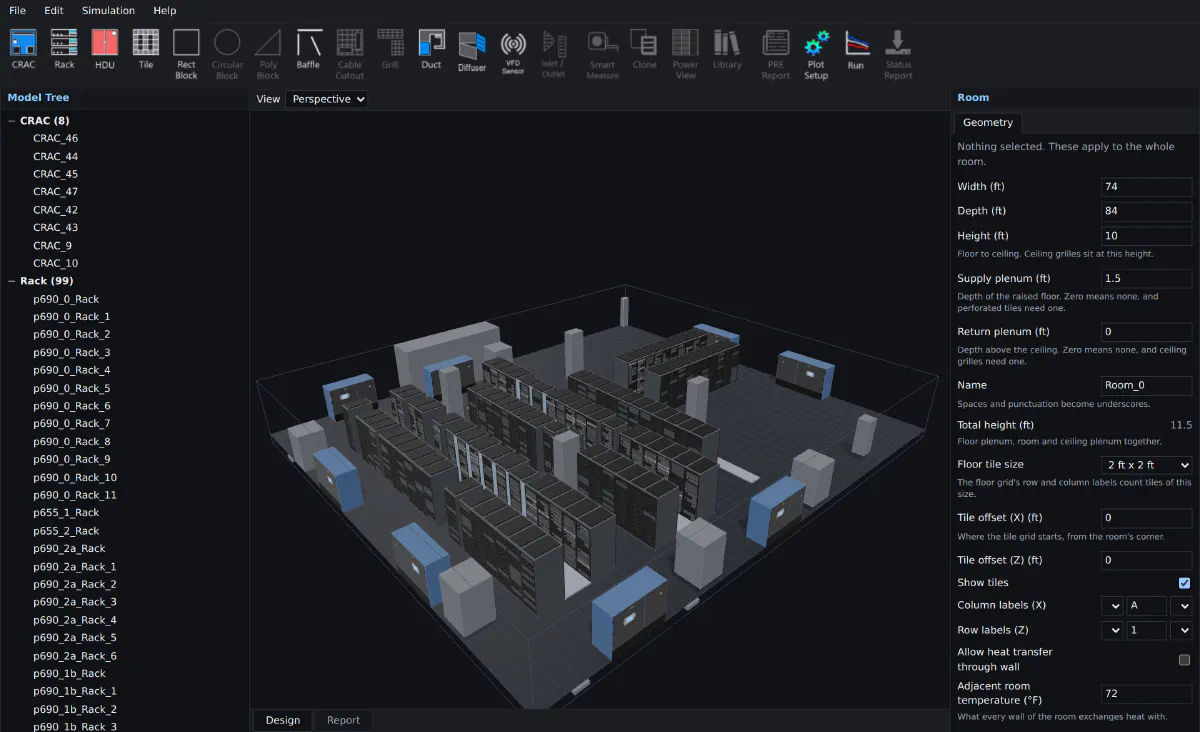
The model builder with the Demo Data Center example open. The toolbar names equipment the way a data center team does: CRAC, Rack, Tile, Duct, Diffuser.
Ansys Fluent, run in the cloud
You build the model on your own computer, or in your browser with the free Model Builder, which needs no account. Meshing, solving and post-processing run on our servers in the cloud, so there is no CFD hardware or solver license to buy. Applied Math Modeling is an Ansys Technology Partner, and CoolSim solves with Ansys Fluent.
CoolSim is licensed as an annual subscription that includes cloud compute, measured in Compute Units. Licensing explains how plans work, and you can request a 30-day trial to model your own facility first.
Support from the people who run the solver
Every simulation runs on our servers, so when one fails, our support engineers can read its solver logs and find the cause. Where the problem is in the model, they can correct it and resubmit the job.
A report for every run
Every completed run produces a Data Center Output Report, generated automatically. It lists the airflow and temperature at every piece of equipment in the room, with images and animations of the results. The Summary Report pages at the front give the result against the ASHRAE recommended range, the RCI and RTI cooling metrics, and every rack on a map of the hall.
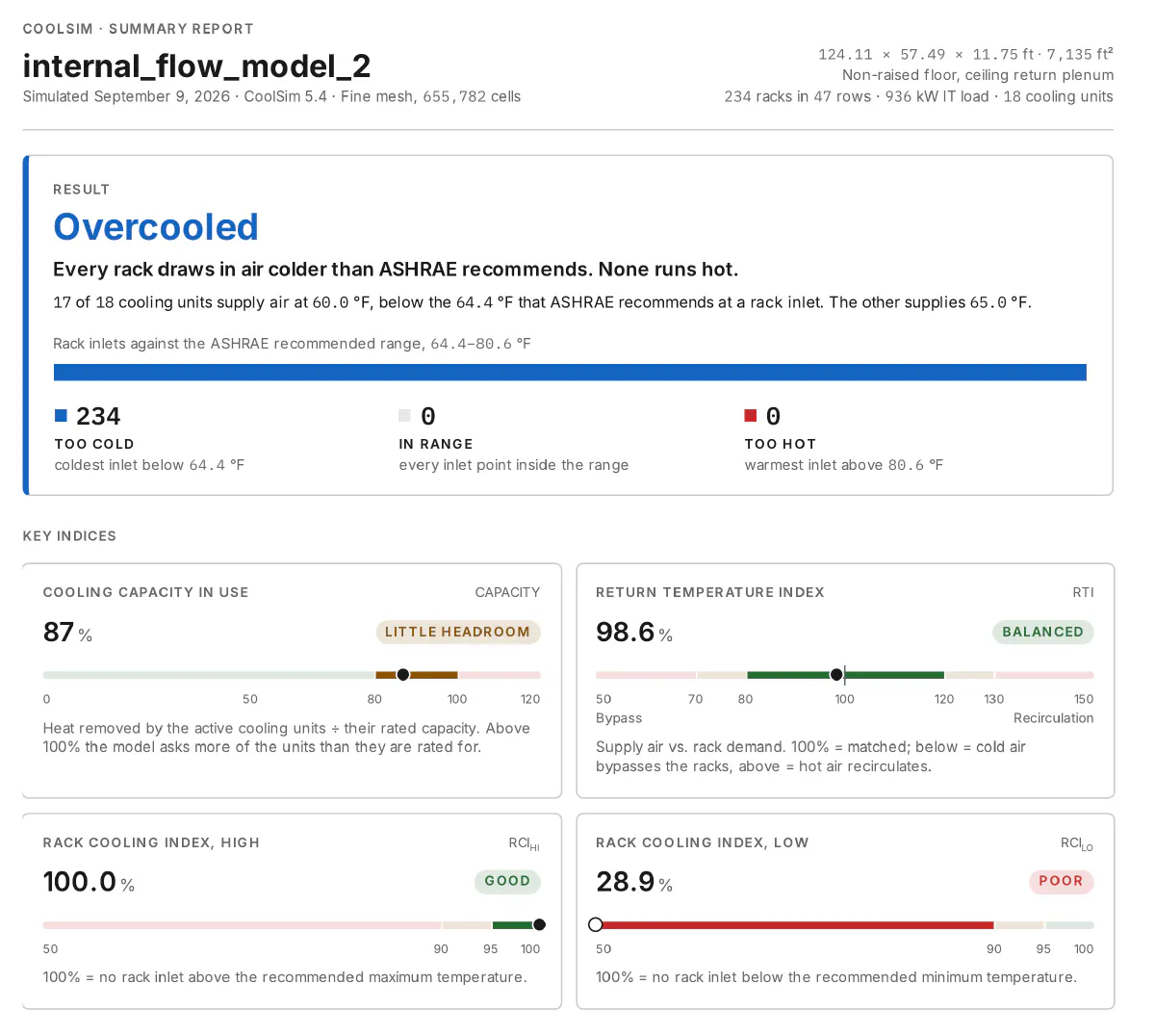
Page one of the Summary Report for an example hall: the result against the ASHRAE recommended range, then four key indices.
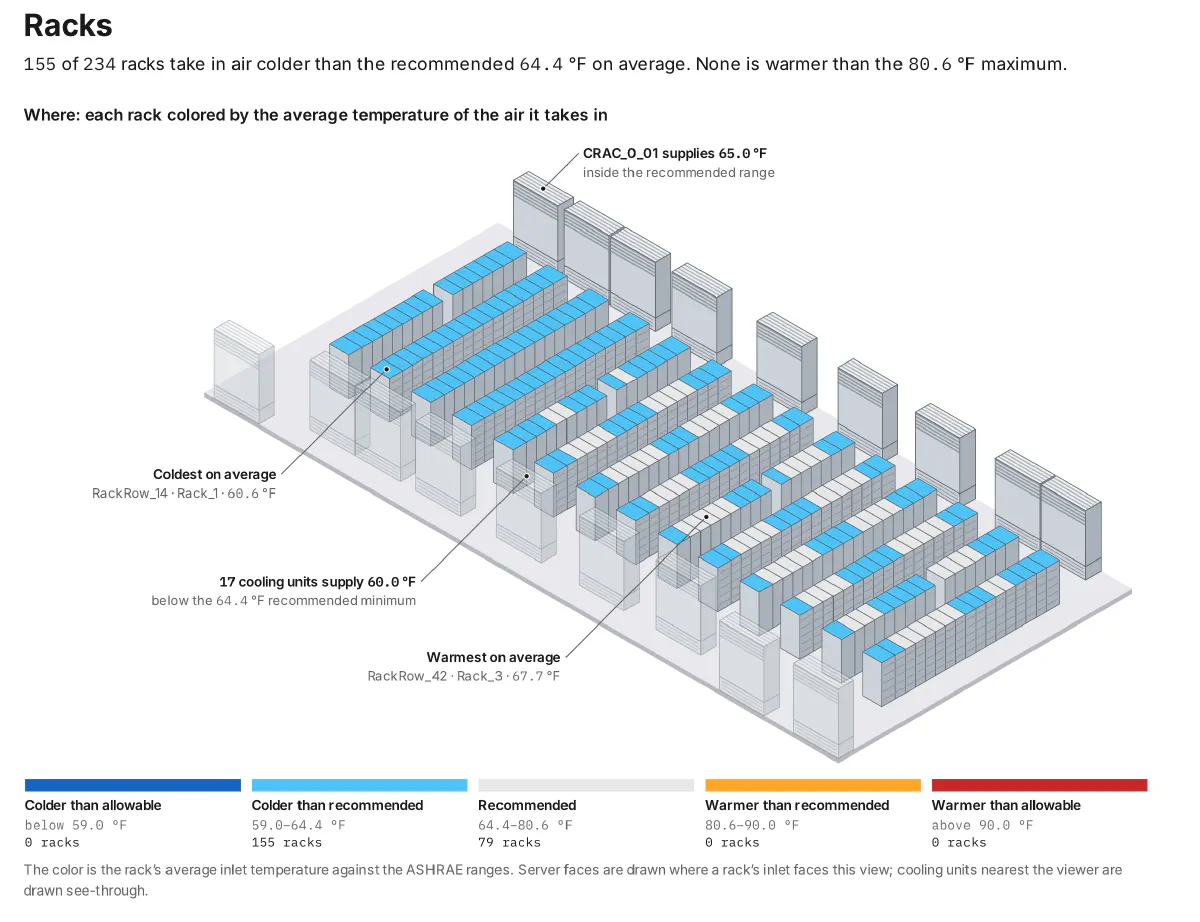
Page two: every rack on a map of the hall, colored by the average temperature of the air it takes in. Here most racks are blue, colder than ASHRAE recommends.
The 3D results open in a viewer inside the report that you can turn and zoom with the mouse. The report is a web page, so sharing it means sending its link.
Modeling capabilities
Rooms, with or without a raised floor
CoolSim models rooms with and without a raised floor, including:
- raised floors and ceiling return plenums;
- rooftop units (RTUs);
- fan walls blowing across a slab floor;
- angled walls; and
- obstructions such as cable trays under the floor or overhead, and building columns.

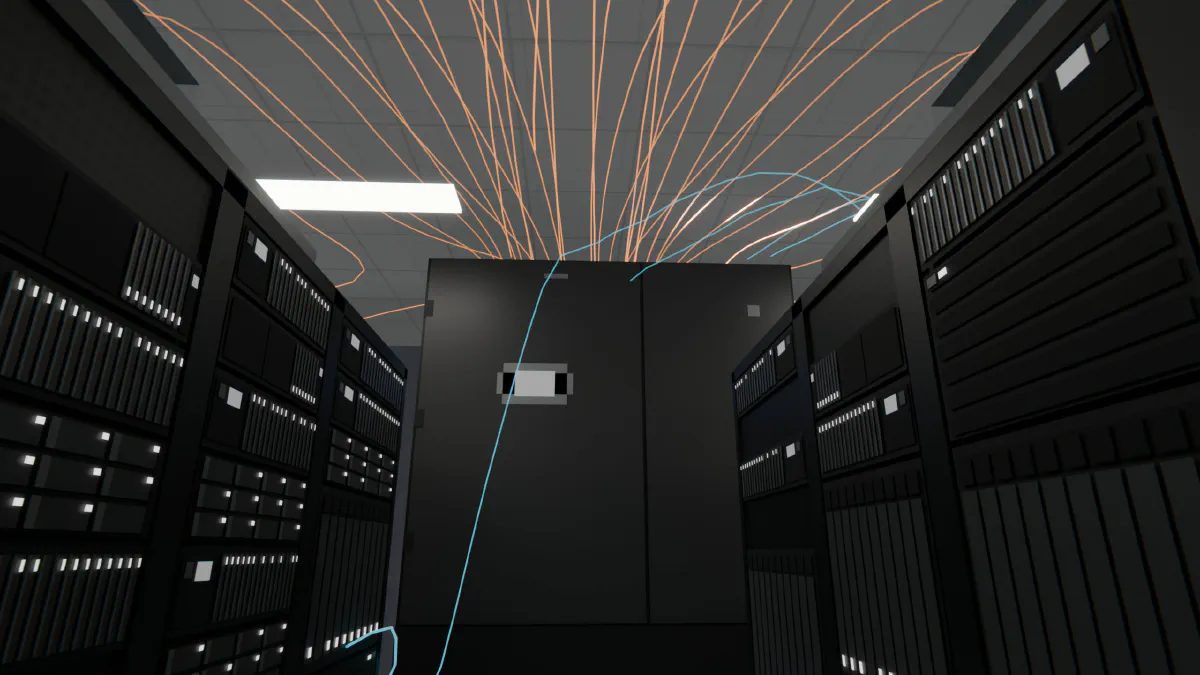
Down a cold aisle of the same hall. Blue lines trace supply air rising from the floor; orange lines trace warm air along the ceiling.
Cooling units
A cooling unit can:
- hold a constant supply temperature;
- vary its cooling capacity with a thermostat on the supply or return air, following a straight line or a performance curve; or
- vary its airflow with a variable-frequency drive (VFD), following temperature or pressure-difference sensors placed in the model.
The equipment library includes downflow, upflow and in-row cooling units, and a unit can be defined to match your own equipment.
A cooling unit at the end of a row, with warm air (orange) running back along the ceiling into its top.
Ducts and diffusers
Ducts and diffusers can be placed anywhere in the room, and each diffuser adjusted to balance the flow.
IT racks
Each rack carries its heat load and airflow, and a rack can be filled server by server, by rack-unit position. For a liquid-cooled rack you enter the share of its heat that the liquid removes, and the model carries the rest into the room air.
Cooling-failure studies (CPV)
CRAC Parameter Variation (CPV) runs a model and up to three variations of it from one submission, four runs in all. Each variation changes cooling-unit settings: on or off, airflow, or supply temperature. Turning units off one at a time shows whether the room rides through the loss of any one of them, which is the question a failure modes and effects analysis (FMEA) asks of the cooling. How quickly the room heats up while a unit is off is a separate question, answered by a transient thermal-failure study.
External flow
A site model places the buildings, and the heat-rejection equipment on and around them, in a wind of set direction, speed and temperature. The wind enters the model as a uniform stream, the same speed at every height. The model shows where warm exhaust goes and whether it reaches another unit’s intake, so equipment placement and spacing can be compared before anything is built. Campus-scale external flow is one of the specialized studies below.
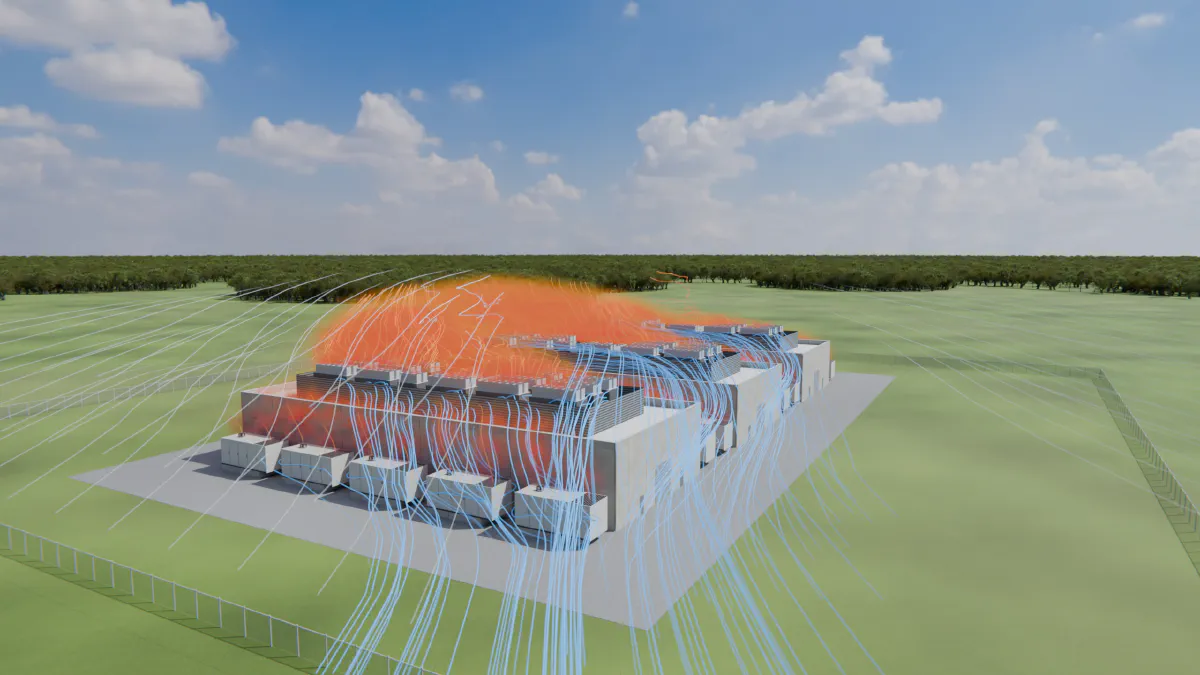
Wind across a data center campus on a 110 °F day. Blue is the wind; the orange cloud is air the equipment has heated above it.
General-purpose inlets and outlets
Inlets and outlets can be added anywhere to represent other air paths into or out of the room, each set by its mass flow rate, temperature and flow direction.
Specialized studies
Some questions need more than a steady-state model of one room. We run these studies as an add-on to a subscription or as a consulting engagement:
- Transient thermal failure: how quickly rack intake temperatures rise after cooling units stop.
- Campus-scale external flow: several buildings and their heat-rejection equipment, across a whole site.
- Pollutant dispersion: where generator exhaust goes, and how much of it reaches building air intakes.
Talk to us about your scenario.
Background
CoolSim was first developed at Fluent, Inc. (now part of Ansys) in 2005. Applied Math Modeling was formed in 2008 by members of that team and has developed and supported CoolSim since. To see what it shows about your own layout, build it in the free Model Builder and email it to us, or request a 30-day trial.